Javascript documentation
Basics to Javascript
Primitive types of JS
Primitive types are types of information you can store in javascript
- Numbers
- Strings
- Booleans
- Null
- Undefined
- Symbols
- BingInt
Numbers
JS has one number type;
- Positive numbers
- Negative numbers
- Whole numbers (integers)
- Decimal numbers
Math operations
- Additions - 50 + 5
- Subtractions - 90 - 1
- Multiplication - 1111 * 7
- Division - 400 / 25
- Modulo (remainder operator) - 27 % 2 (commonly used to tell if a number is odd or even)
- Exponentiation (power operator) 9 ** 3 (9 * 9 * 9)
Order of operations
Order of operations is the order the JS calculates the math
PEMDAS;
- Parenthesis
- Exponents
- Multiplication
- Divisions
- Addtions
- Subtractions
NaN
NaN is a number in JS that stands for 'Not A Number'
Variables & Let
Variables are like labels for values. We can store values and give it a name so that we can ;
- Refer back to it later
- Use that value to do stuff with
- Or change it later on
let variableName = value;
Variable Examples
                    let year = 1985;

                    let totalChickens = numHens + numRoosters;;

                    let score = score + 5;
If we update the value umHens after declaring totalChickens, the value in totalChickens will not change until we declare it again.
Updating Variables
The following code takes the score variable and sets it equal to score and then add 5.
                    score += 5;

                    score -= 50;

                    score *= 2;

                    score /= 2;
It is so common to increment or decrement by 1, that there is a shortcut for it;
                    Numlives--;

                    NumLives++;
Const & Var Variables
Var = Variable - This is an old variable and not needed to be used. Use let or const
Const = Constant
Const works just like let but you CANNOT change the value in the variable.
                    const hens = 4;

                    hens = 20; // ERROR;
const makes sense over let in arrays and objects.
const daysInWeek = 7;
Booleans
Booleans can only hold true or false values.
                    let isLoggedIn = true;

                    let gameOver = false;
Variables can change type, when updating the variables value, you can change the type from number to string or boolean.
Strings
Strings are a string of characters. They represent text and must be wrapped in quotes.
let username = "Danny";
Strings are indexed, and each character has a corresponding index number.
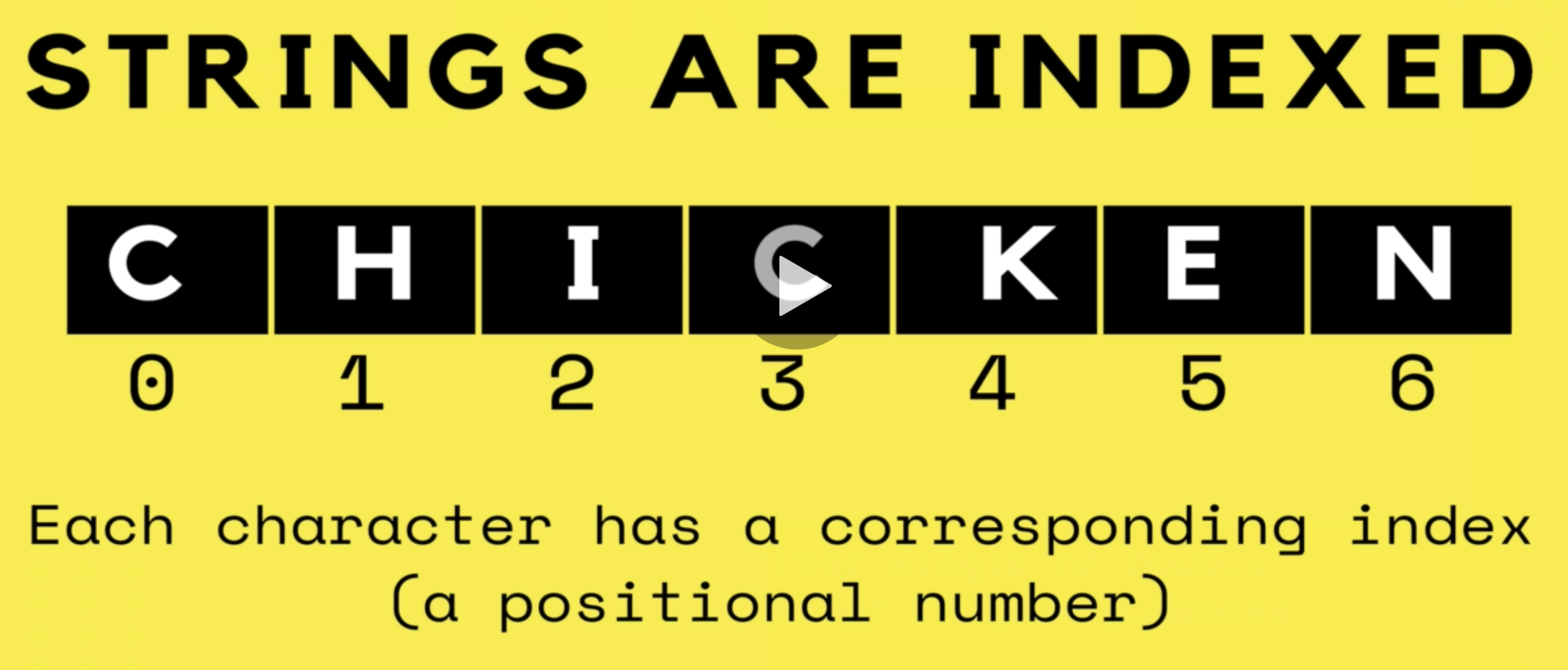
We can access the positional number of strings. In the below example, animal[0] will equal "D"
                    let animal = "Dumbo
                        Octopus";

                    animal[0];
This is useful when creating logic to check characters in a password or the country code in a phone number etc.
String Properties
There is only 1 string property which is length
string.length
String Methods
Strings come with a set of built in actions, methods that we can perform, such as ;
- Searching within a string
- Replacing part of a string
- Changing the casing of a string
string.method();
Examples of string methods;
                    let yellMsg = msg.toUpperCase();

                    msg.toUpperCase();
List of some methods
- .toUpperCase
- .toLowerCase
- .trim - This trims off whitespace at the start and end of strings.
You can add multiple methods to a string - msg.trim().toUpperCase()
String methods with arguments
Some string methods accept arguments that modify their behavior. We pass these arguments inside the parenthesis.
string.method(arg);
                    let tvShow = 'catdog';

                    tvShow.indexOf('cat');
                    // 0

                    tvShow.indexOf('dog');
                    // 3

                    tvShow.indexOf('z');
                    // -1 (not found)
The indexOf method checks if the search term you pass in the argument is in the string, and it prints out the index number. This is commonly used to see if passwords contain dollar signs etc.
List of some methods that accepts arguments;
- .indexOf('cat'); This prints the index number of what search term you pass in the argument.
- .slice(4, 10); This slices a string to create a new string, 2 arguments are start and end of slice. You can use negative numbers to slice from the end. This will not change variables.
- .replace('haha', 'tehe'); This finds the string and replaces it with the second string that is passed in the argument. - Replace only replaces the first instance, not all instances.
- .repeat(10); This will repeat x amount of times.
String template literals
Template literals are strings that allow embedded expressions, which will be evaluated and then turned into a resulting string. This is super handy for adding variables and calculations within strings.
`I counted ${3 + 4} sheep` // "I counted 7 sheep"
To use template literals, you must use back-tick characters instead of quote marks. And the expressions start with dollar sign and curly braces.
                    `You bought ${qty} ${product}. Total is ${price *
                        qty}` // "You bought 5 atichokes. Total is
                    11.25"
Null & Undefined
- Null
- "Intentional absense of any value", similar to using false
- Must be assigned
- Undefined
- Any values that have not been defined yet.
let loggedInUser = null;
Math object
Contains propeties and methods for mathematical constants and functions.
                    Math.PI // 3.141592653589793


                    // Rounding a number

                    Math.round(4.9) // 5


                    // Absolute value

                    Math.abs(-456) // 456


                    // Raised 2 to the 5th power

                    Math.pow(2,5) // 32


                    // Removes decimal

                    Math.floor(3.9999) // 3


                    // Round up

                    Math.ceil(2.111) // 3
Random numbers
Math.random() gives us a random decimal between 0 and 1 but will not include 1.
                    Math.random() // 0.141592653589793

                    Math.random() // 0.908265672981921

                    Math.random() // 0.821761721089176
Random integers
Let's generate random numbers between 1 and 10.
                    const step1 = Math.random(); //
                    0.141592653589793

                    const step2 = step1 * 10; //
                    1.41592653589793

                    const step3 = Math.floor(step2);
                    // 1

                    const step4 = step3 + 1; //
                    2


                    Math.floor(Math.random() * 10) +
                        1;
We have to plus 1 to the calculation otherwise the random numbers will go from 0 - 9 instead of 1 - 10
Boolean logic
Boolean logic is creating logic based on true and false, such as;
- Is the user logged in?
- Are there any comments?
Comparison Operators
                    > // greater than

                    < // less than

                    >= // greater than or equal to

                    <= // less than or equal to

                    == // equality

                    != // not equal

                    === // strict equality

                    !== // strict non-equality
Double equals vs triple equals
Double equals / not equal
- Checks for eqaulity of value, but not equality of type.
- It coerces both values to the same type and then compares them.
- This can lead to some unexpected results!
                    1 == 1 // true

                    1 == '1' // true

                    0 == false // true

                    0 != '1' // false
Triple equals / strict non-equality
- Checks for eqaulity of value AND equality of type.
                    1 === 1 // true

                    1 === '1' // false

                    0 === false // false

                    0 !== '1' // true
We should always use triple equals when comparing things.
Console, alerts & Prompts
List of console methods;
- console.log() prints arguments to the console. This is the JS version of print
- console.dir() prints all of the JS object attributes we can use.
- console.warn() prints warnings to the console
- console.error() prints errors to the console
- alert("Hi there") Creates a pop up with the text "Hi there"
- prompt("Please enter a number") Creates a pop up with the text "Please enter a number" and a field where the user can enter data
This is needed when working in JS files.
How to run a JS file
- Create a js file called app.js or script.js
- Add <script src=""app.js"></script> to the end, but inside, of the body in the HTML file.
- All console.log() will run in the console once the website is loaded.
Conditional statements
If statements
                    let rating = 3;


                    if (rating
                    === 3) {

                    console.log("YOU ARE A SUPERSTAR!");

                    }
Else If statements
If the If statement is false, then we run Else if
                    let rating = 2;


                    if (rating
                    === 3) {

                    console.log("YOU ARE A SUPERSTAR!");

                    }

                    else if (rating
                    === 2) {

                    console.log("MEETS EXPECTATIONS");

                    }

                    else if (rating
                    === 1) {

                    console.log("NEEDS IMPROVEMENT");

                    }
Else statements
The else statement runs if all if statements and else if statements are false.
                    let rating = -99;


                    if (rating
                    === 3) {

                    console.log("YOU ARE A SUPERSTAR!");

                    }

                    else if (rating
                    === 2) {

                    console.log("MEETS EXPECTATIONS");

                    }

                    else if (rating
                    === 1) {

                    console.log("NEEDS IMPROVEMENT");

                    }

                    else  {

                    console.log("INVALID RATING");

                    }
Nesting conditional statements
We can nest if else statements inside of eachother to nest complex logic
The code below first checks if the password has 6 characters, if true, then check if password has spaces or not.
                    if (password.length
                    >= 6) {

                    if (password.indexOf
                    (' ') === -1) {

                    console.log("Valid password");

                    }

                    else {

                    console.log("Password cannot contain spaces");

                    }

                    else  {

                    console.log("Password is too short, must be atleast 6
                    characters");

                    }
Truthy or Falsy values
- All JS values have an inherent truthyness or falsyness about them.
- Falsy Values
- false
- 0
- "" (empty string)
- null
- undefined
- NaN
- Everything else it truthy!
Logical Operators
Logical operators allow us to combine multiple expressions. There are 3 core operators;
- And
- Or
- Not
And Operator (&&)
Both sides must be true for the entire thing to be true
And will always run before the or operator
                    1 <= 4 &&
                    'a' === 'a';
                    // true


                    9 > 10 &&
                    9 >= 9;
                    // false
Or Operator (||)
If one side is true, the entire thing is true
And will always run before the or operator, if you want the or operator to run first, add parenthesis around it.
                    let age = 76;


                    if(age <
                    6 || age >= 65) {


                    console.log('You get in for
                        free!');

                    }


                    else }

                    console.log('That will be $10
                        please');

                    }
Not Operator (!)
Expression returns true if expression is false.
                    !null // true


                    ! (0 === 0) // false


                    ! (3 <= 4)
                    // false
We can use the Not Operator if we want to run code if there is not something entered such as first name, instead of typing if first name equalled to an empty string
The Switch Statement
The switch statment is another control-flow statement that can replace multiple if statements.
A switch is designed to run the code from which case is true, and then keep running the code for the following cases until a break keyword is added. This is very helpful if we want to run many cases at the same time. See case 6 and 7 in the example below.
The default keyword acts as an else statement
                    const day = 2;

                    switch (day) {


                    case 1:

                    console.log("MONDAY!");

                    break;


                    case 2:

                    console.log("TUESDAY!");

                    break;


                    case 3:

                    console.log("WEDNESDAY!");

                    break;


                    case 4:

                    console.log("THURSDAY!");

                    break;


                    case 5:

                    console.log("FRIDAY!");

                    break;


                    case 6:

                    case 7:

                    console.log("IT'S THE
                        WEEKEND!");

                    break;


                    default:

                    console.log("INVALID
                        NUMBER!")


                    }
Javascript Arrays
Arrays is a data structure that allows us to store multiple values within a variable and group variables together.
Data structure A collection of data
Arrays is an ordered collection of values, such as;
- List of comments on an IG post
- Collection of levels in a game
- Songs in a playlist
Creating arrays
- Data in arrays are ordered from left to right.
- Arrays has a length property similar to strings.
                    // To make an empty array

                    let students = [];


                    // An array of strings

                    let colors = ['red',
                        'orange', 'yellow'];


                    // An array of numbers

                    let lottoNums = [19,22,56,12,51];


                    // A mixed array

                    let stuff = [true,
                        68, 'cat', null ];
Array random access - How to access data in arrays
Each element in an array is assigned an index, just like strings, starting from 0
                    color[0];
                    // This will return the first
                    color in the color array.
Modifying or adding to arrays
- We can add or change elements in arrays, something we cannot do with strings.
- We can add a new element in any slot such as element 10, the other slots in between will be empty and undefined.
                    let colors = ['rad',
                        'orange', 'yellow'];


                    colors[0] =
                    'red'; //Changing 'rad' to 'red'


                    colors[3] =
                    'green'; //Adding 'green' as the 4th color in the array
Array Methods
- Push add to end
- Pop remove from end
- Shift remove from start
- Unshift add to start
                    let movieLine = ['tom',
                        'nancy'];


                    movieLine.push('oliver'); // Adds the string 'oliver' to the end of
                    the array.


                    movieLine.push('harry',
                        'hermione'); // Pushes multiple strings to the end of the array.


                    movieLine.pop(); // Pop will remove the
                    last element in the array, no argument is needed within the parenthesis.


                    movieLine.shift(); // Shift will remove the
                    first element in the array, no argument is needed within the parenthesis.


                    movieLine.unshift('VIP'); // Unshift will add an element to the
                    start of the array.
More Array Methods
- concat Merge arrays
- includes Look for a value
- indexOf Just like string.indexOf
- join Creates a string from an array
- reverse Reverses an array
- slice Copies a portion of an array
- splice Removes and replaces elements
- sort Sorts an array
Concat
Concat combines arrays but does not modify the originals.
                    const array1 = ['a','b','c'];


                    const array2 = ['d','e','f'];


                    const array3 = array1.concat(array2);


                    console.log(array3);
                    // expected output : Array ['a', 'b', 'c', 'd', 'e', 'f']
Includes
Includes returns a boolean value. True if the array includes the argument, false if it does not.
                    const array1 = [1,2,3];


                    console.log(array1.includes(2));
                    // expected output : true
IndexOf
IndexOf works similar as with strings, but finds the index number of an element instead of a character. Can also be used to tell us if an element is in an array or not just like the includes method
                    const animals = ['camel','giraffe','duck'];


                    console.log(animals.indexOf('giraffe'));
                    // expected output : 1


                    console.log(animals.indexOf('tiger'));
                    // expected output : -1
Reverse
Reverse Reverses the order of an array. This is known as a destructive method as it will change the orignal.
                    const array = ['one','two','three'];


                    array.reverse();
                    // expected output : array ['three', 'two', 'one']
Slice
Slice gets a copy or a 'slice' of an array
                    const animals = ['ant', 'bison',
                        'camel', 'duck', 'elephant'];


                    animals.slice(2, 4);
                    // expected output: Array ['camel', 'duck']

                    animals.slice(3);
                    // expected output: Array ['duck', 'elephant']

                    animals.slice(-3);
                    // expected output: Array ['camel', 'duck', 'elephant']
Splice
Splice changes the contents of an array by removing or replacing existing elements or adding new elements. Destructive Method
The syntax is a little weird, the arguments we pass are element.splice(Start of splice, How many elements to delete, What to enter);
                    const months = ['January', 'March',
                        'April', 'December'];


                    months.splice(1, 0,
                        'February');
                    // expected output: Array ['January', 'February', 'March', 'April',
                    'December']

                    months.splice(3, 1,
                        'May', 'June');
                    // expected output: Array ['January', 'February', 'March', 'April',
                    'May', 'June']
Sort
Sort sorts an array.
The default sort order is ascending, built upon converting the elements into strings, then comparing their sequences of UTF-16 code units values. THIS DOES NOT SORT IN NUMERICAL ORDER, WE NEED TO PASS FUNCTIONS TO SORT LOGICALLY.
                    const scores = [2, -12,
                        100, 60];


                    scores.sort();
                    // expected output: Array [-12, 100, 2, 60]
Equality testing arrays
When using triple or double equals on arrays, they return false. JS does not compare the contents of arrays, it compares the references in memory. Each array has a unique reference in memory much like having a personnummer.
Comparing arrays only come back true of two different variables are referring to the exact same array.
Const + Arrays
Even though const normally not changeable, const is commonly used in arrays and the values inside the const arrays can be changed, as long as the reference stays the same, for example, not re-assigning a new array or number or string.
Nested Arrays
We can store arrays inside of arrays!
                    const airplanSeats = [


                    ['Ruth', 'Anthony', ''Stevie],

                    ['Amelia', 'Pedro', 'Maya'],

                    ['Xavier', 'Anaya', 'Luis'],

                    ['Luke', null,
                        'Deniz'],

                    ['Rin', 'Sakura', 'Francisco'],

                    ]


                    airplaneSeats[3][1] =
                    'Hugo';
                    // changes null to 'Hugo'
Object Literals
Our second data structure. Just like arrays, objects help us store multiple pieces of data together but instead of storing data in an ordered structure, objects are collections of properties. Properties are key-value pairs, instead of accessing data using an index, we use custom keys
Property = Key + value
Objects is about labelling the data.
Within object literals, you can store all types of elements such as arrays and other object literals.
                    const fitBitData = {

                    totalSteps : 308727,

                    totalMiles : 211.7,

                    avgCalerieBurn : 5755,

                    workoutsThisWeek : '5 out of
                        7',

                    avgGoodSleep : '2:13',

                    };


                    const youtubeComment = {

                    username : 'Crazy Cat Lady',


                    upvotes : 7,

                    text : 'Great video!',

                    tags : ['#array', '#video,
                        '#arraysInObjects'],

                    };


                    Key : Value,
Accessing data out of object literals
                    fitBitData["totalSteps"]; // You can add variables and
                    expressions inside the brackets which you cannot do with the dot syntax.

                    OR

                    fitBitData.totalSteps;
Excercise = Make variable called fullAddress containing address of the resturant
                    const restaurant = {

                    name: 'Takanaka',

                    address: 'Storgatan 7',

                    city: 'Halmstad',

                    state: 'Halland',

                    zipcode: '302 39',

                    }


                    // Solution Below

                    let fullAddress = `${restaurant.address}, ${restaurant.city}, ${restaurant.state}, ${restaurant.zipcode}`;
Modifying objects
                    fitBitData.totalSteps = 10100;


                    // To add more data to object literals, use the same as above but add a new Property

                    fitBitData.weightsLifted = '200kg';
Nesting Arrays and Objects
Arrays and objects are very commonly used together.
                    // Below is an array of objects

                    const shoppingCart = [

                    {

                    product: 'Jenga Classic',


                    price: 6.88,

                    quantity: 1,

                    },


                    {

                    product: 'Echo Dot',


                    price: 29.99,

                    quantity: 3,

                    },


                    {

                    product: 'Amazon Fire Stick',


                    price: 39.99,

                    quantity: 2,

                    }

                    ]


                    // Below is an object with arrays and objects nested in

                    const student = {

                    firstName: 'David',

                    lastName: 'Jones',

                    strengths: ['Music',
                        'Art'],

                    exams: {

                    midterm: 92,

                    final: 88,

                    }

                    }
JS Loops
JS Loops helps us repeat logic over and over without re-writing code.
Types of Loops;
- For Loop
- While Loop
- For .... of Loop
- For .... in Loop
For Loop
It is really common to name variables i in For Loops as there is no purpose of the variable apart from to exist in the For Loop. i is a counter variable and originally stood for index.
                    for (

                    [initialExpression];

                    [condition];

                    [incrementExpression]

                    )


                    // Start at 1, stop at 10, add 1 each time.

                    for (let i = 1; i <= 10;
                    i++) {

                    console.log(i);

                    }
The perils of infinite loops
An infinite loop is a loop that never stops. Avoid at all costs, causes the computer to crash.
Looping over Arrays
Looping arrays is extremely common. For example, start at index 0, and continue looping until the last index (length-1)
                    const animals = ['lions',
                        'tigers', 'bears'];


                    // Prints out the elements in the array to the console

                    for (let i = 0; i < animals.length;
                    i++) {

                    console.log(animals[i]);

                    }


                    // Prints out the elements in the array IN REVERSE

                    for (let i = animals.length - 1; i >= 0;
                    i--) {

                    console.log(animals[i]);

                    }
Nesting Loops
You can nest loops inside of loops, the nested loop will run as many times as the intial loop runs. It is common to use j as the variable in nested loops, and then continue the alphabet for more nested loops. Or we can use inner and outer
Nested Loops are common when iterating across nested arrays without nesting loops, when printing our nested arrays, each array would print instead of each element within the array.
                    const seatingChart =
                    [

                    ['Kristen', 'Erik','Namita'],

                    ['Geoffrey', 'Juanita', 'Antonio', 'Kevin'],

                    ['Yuma', 'Sakura', 'Jack', 'Erika']

                    ]


                    for (let i = 0;
                    i < seatingChart.length; i++) {

                    const row = seatingChart[i];


                    console.log(`Row #${i + 1}`)

                    for (let j = 0;
                    j < row.length; j++) {

                    console.log(row[j])

                    }

                    }


                    // Expected Output

                    Row #1

                    Kristen

                    Erik

                    Namita

                    Row #2

                    Goeffrey

                    Juanita

                    etc. etc. etc.
While Loops
While loops continue running as long as the test condition is true
For Loops are preffered if we have a set number of iterations, While loops are preferred when we truly do not know how many iterations to loop, such as user input, or a game loop when looping until someone has won the game.
                    let num = 0;

                    while (num < 10) {

                    console.log(num);

                    num++;

                    }


                    // Below will prompt user to enter the correct passowrd until the password is correct, then log a congrats message to console.

                    const password = 'babyHippo';

                    let guess = prompt('Enter correct
                        password');


                    while (guess !== password) {

                    guess = prompt('Enter correct
                        password');

                    }


                    console.log('Congrats, password is
                        correct')
The Break Keyword
Break keyword is most commonly used with while loops
Once the loop hits the break keyword then the loop will break out and resume running the rest of the code.
                    // Below will prompt user to enter something which will then be repeated back to them. This will run until the user inputs 'stop' then the break keyword will break the loop

                    let input = prompt('Say something');


                    while (true) {

                    input = prompt(input);

                    if (input.toLowerCase() === 'stop') {

                    break;

                    }

                    }


                    console.log('You Win')
For...Of Loop
An easy way to iterate over Arrays or other iterable Objects (Not object literals)
This is not supported by Internet Explorer!
                    for (variable of iterable) {

                    statement

                    }


                    const subreddits = ['chickens', 'books', 'football'];

                    for (sub of subreddits) {

                    console.log(sub);

                    }


                    //Expected Output =

                    Chickens

                    Books

                    Football


                    // Re-writing the seating chart loop from the nested loops section

                    const seatingChart =
                    [

                    ['Kristen', 'Erik','Namita'],

                    ['Geoffrey', 'Juanita', 'Antonio', 'Kevin'],

                    ['Yuma', 'Sakura', 'Jack', 'Erika']

                    ]


                    for (let row of seatingChart) {

                    for (let student of row) {

                        console.log(student);

                        }

                        }
Iterating over Object literals
To interate over an object literal we need to use the For In loop which will iterate over the key by default, not the values.
                    const testScores = {

                    keenan: 80,

                    damon: 67,

                    kim: 89,

                    }


                    for (let person in testScores) {

                    console.log(person);

                    }


                    // Expected Outcome =

                    keenan

                    damon

                    kim


                    for (let person in testScores) {

                    console.log(`${person} scored ${testScores[person]}`);

                    }


                    // Expected Outcome =

                    keenan scored 80

                    damon scored 67

                    kim scored 89
Another way to iterate over object literals is using the Object method inside of For of loops
- Object.values(object literal) This will create an array of the values from an object literal
- Object.keys(object literal) This will create an array of the keys from an object literal
- Object.entries(object literal) This will create an nested arrays of the key/value pairs from an object literal
JS Functions
Functions are reusable chunks of code that we have wrapped up and given a name. We can define a chunk of code that we can then execute at a later time.
2 step process, 1 = Define the function, 2 = Run the function.
Defining a function
                    function funcName() {

                    // do something

                    }


                    function grumpus()
                    {

                    console.log('urgh, you again!');

                    console.log('for the last time ....');

                    console.log('LEAVE ME ALONE!');

                    }
Running a function
funcName();
Passing arguments in a function
You can pass multiple arguments within the parenthesis.
                    function greet(firstName, lastName)
                    {

                    console.log(`Hi,
                        ${firstName} ${lastName}!`);

                    }


                    greet('Arya Clooney'); // 'Hi, Arya Clooney!'
The Return keyword
The result of functions cannot be saved, they are just values we can print out, but cannot be stored in variables. The Return keyword allows us to capture the results of a function and save it in a variable.
The return keyword stops the function from running. Everything after the return function will not run.
                    function add(x, y) {

                    return x + y;

                    }


                    const sum = add(10, 16);

                    sum; // 26
Function Scope
Variable "visibility" The location where a variable is defined dictates where we have access to that variable.
- Variables we define within a function, are only defined and usable within that function, cannot be used outside of the function.
- You can update existing variables within a function but is not common.
- Variables defined outside of a function can be accessed from within functions.
Block Scope
A block refers to code between any curly braces expect for functions.
- let or const variables are also scoped to blocks as well as functions.
- Using the var keyword will not scope variables to blocks, only functions.
Lexical Scopes
Lexical Scoping refers to when we have nested functions.
- With nested functions, the inner function also has access to the variables defined within the outer function.
- Variables that are defined within the inner functions, are NOT accessible in the outer functions
Function Expressions
Function Expressions are functions that are defined within a variable.
Function expressions do not have a name.
                    const square = function (num) {

                    return num * num;

                        ;

                        square(7); //49
Higher Order Functions
Higher order functions are functions that work with/on other functions. They can;
- Accept other functions as arguments
- Return a function
Passing a function as an argument
                    function callTwice(func) {

                    func();

                    func();

                    }


                    function rollDie()
                    {

                    const roll = Math.floor(Math.random() * 6) + 1

                    console.log(roll)

                    }


                    callTwice(rollDie);
Returning Functions
When we return a function, we need to capture it within a variable.
The first function below accepts 2 arguments, min and max. We then return another function. We can then save the first function within a variable called isChild and pass the min and max, then call the isChild variable to see if someone is a child or not. True or false. We could then create more variables such as isAdult or isSenior and pass other min and max arguments.
                    function makeBetweenFunc(min, max) {

                    return function (num) {

                    return num >= min && num <= max;

                    }

                    }


                    const isChild = makeBetweenFunc(0, 18)

                    isChild(40); // false
Defining Methods
We can add functions, as properties in objects, we call them methods
Every method is a function but not all functions are methods
                    const math = {

                    multiply: function(x, y) {

                    return x * y;

                    },

                    divide: function(x, y)
                    {

                    return x / y;

                    },

                    square: function(x)
                    {

                    return x * x;

                    }

                    };


                    // calling the method

                    math.square(4); // 16
New shorthand syntax
                    const math = {

                    multiply(x, y) {

                    return x * y;

                    },

                    divide(x, y) {

                    return x / y;

                    },

                    square(x) {

                    return x * x;

                    }

                    };


                    // calling the method

                    math.square(4); // 16
'This' keyword in Methods
Use the keyword this to access other properties in the same object. Such as in the example below, I create a method within an object literal called meow, to access name or breed within the method, I need to use the this keyword.
                    const cat = {

                    name: 'Blue Steele',

                    color: 'grey',

                    breed: 'scottish fold',

                    meow() {

                    console.log(`${this.name} says MEOWWW`);

                    }

                    }
WARNING
The value of the keyword this, can change depending on the invocation context of the function its used in. Meaning that it depends on how we call the function.
Above warning means that the this keyword will refer to whatever is on the left side of the .method, in the above case it is meow, but for example, if we put meow into another variable that simply calls the meow function, there will be nothing on the left side of the .method, so by default, the this keyword will then refer to the window method.
Arrow Functions and This Keyword
When using the keyword this within arrow functions the keyword this refers to the same value in the scope of where the function was orignally created. Meaning, using the keyword this in nested function results in this referring back to the first functions value rather than the value of the nested function.
When testing JS code
Try/Catch
A way to try code blocks and catch errors to stop them from running and prevent computer and code from crashing.
Using the try/catch method will allow the rest of the code to run even if errors are caught.
This is a great way for us to handle and create our own error messages.
                    try {

                    // code block goes here!

                    }

                    // we pass a parameter (error) which stores the error which we can display to user

                    catch(error) {

                    // error code block goes here!

                    }
Callbacks & Array methods
The following Array methods require us to pass in functions
The forEach Method
forEach Method accepts a callback function and calls the functions once per element in the array.
The forEach Method used to be a lot more common before the invention of the for of loop
                    const nums = [9, 8, 7, 6, 5, 4, 3, 2, 1];


                    // prints: 81, 64, 49, 36, 25, 16, 9, 4, 1

                    nums.forEach(function (n) {

                    console.log(n * n)

                        ]);
The map Method
The map Method creates a new array with the results of calling a callback on every element in the array.
The above means that this works the same as the forEach Method but it then creates a new away from the returned values or 'maps' a new array. For example, in the above example, 81, 64, 49, 36, 25, 16, 9, 4, 1 is printed out, the map Method will map this as a new array.
The map function does not mutate or change the original array, we need to save the results to a new variable.
                        const numbers = [1, 2, 3, 4, 5, 6,
                            7, 8, 9];


                        // This will take the numbers array, double each number and then save it into a new array with the variable name, doubles.

                        const doubles = numbers.map(function (num) {

                        return num * 2;

                        })
Arrow Functions
Arrow functions are a new syntax for defining functions. Allows us to write a function without using the function keyword.
No Internet Explorer support!
                        const sum = (x, y) => {

                        return x + y;

                            )
Arrow Functions Implicit Returns
Implicit returns is a way to compact functions even further by allowing us to leave off the return keyword. Only for arrow functions.
To use implicit returns, simply replace {} with ∥)
You can also create one-liner implicit returns by getting rid of the ()
Only works with a single expression in the parenthesis
                        // Regular function expression

                        const isEven = function (num) {

                        return num % 2 === 0;

                        }


                        // Arrow Function

                        const isEven = (num) => {

                        return num % 2 === 0;

                            }


                            // Implicit Return

                            const isEven = num => (

                            num % 2 === 0

                                );


                                // One-liner implicit return

                                const isEven = num => num % 2 === 0;
setTimeout and setInterval
setTimeout and setInterval expects to pass a callback function in. These delay or postpone execution for a later date. Basically scheduling code execution.
setTimeout runs once, setInterval runs over and over every x amount of seconds passed in the function. clearInterval is used to stop the setInterval function from running.
                        setTimeout(TimerHandler, timeoutNumber);


                        setTimeout(() => {

                        console.log("HELLOO!!")

                        }, 3000) // logs the string to the console after 3 seconds.


                        setInterval(() => {

                        console.log("HELLOO!!")

                        }, 2000) // Repeatedly runs every 2 seconds


                        clearInterval(id); // Stops setInterval from running.
The Filter Method
The Filter Method creates a new array with all elements that pass the test implemented by the provided function.
To 'filter' out elements and make a new array.
The callback needs to return true or false, and if returned true, the element will be passed or 'filtered' into the new array
                        const numbers = [1, 2, 3, 4, 5,
                            6, 7, 8, 9];


                        const odds = numbers.filter((n) => {

                        return n % 2 === 1;

                        })

                        // This will take the numbers array, filter out the odd numbers and save it as a new array called odds


                        const goodTitles = movies.filter(m => m.score > 80).map(m => m.title);

                        // Combining the filter and map methods using arrow functions one liner implicit return.
Every & Some Methods
The Every Method tests whether all elements within the array pass the provided function. It returns a Boolean value.
The Some Method returns true if ANY of the array elements pass the test function.
                        const words = ['dog', 'liverpool', 'dig', 'log', 'bag']


                        words.every(word => {

                        return word.length === 3;

                        }) // false


                        words.some(word => {

                        return word.length === 3;

                        }) // true
Reduce Method
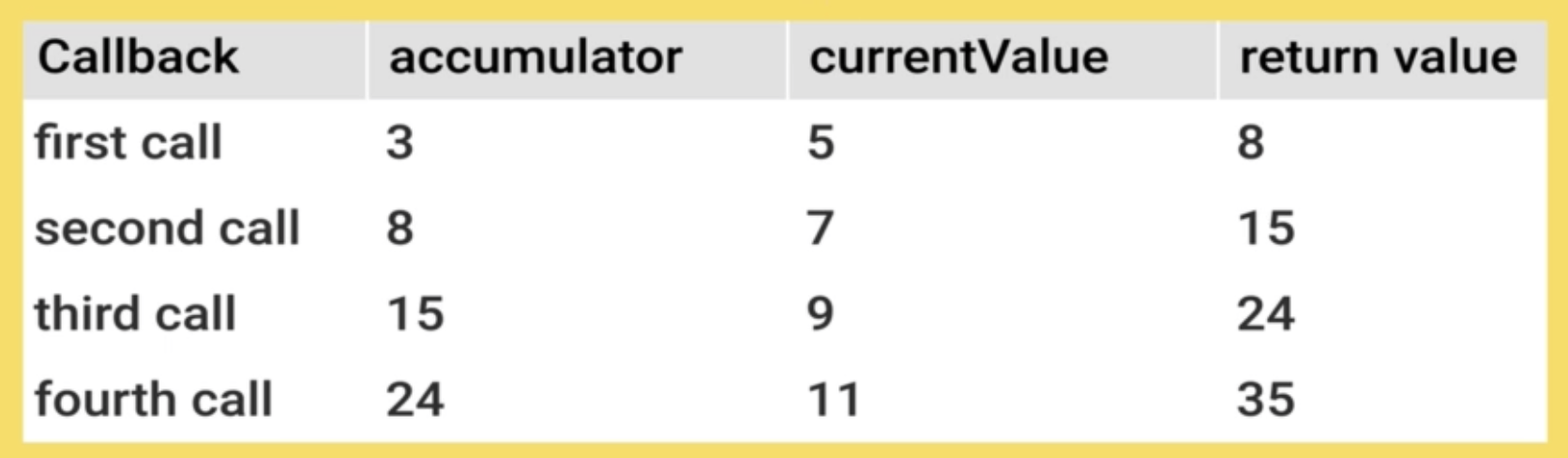
Executes a reducer function on each element of the array, resulting in a single value.
The return value loops one at a time through each element.
                        // Adding all of the elements together

                        [3, 5, 7, 9, 11].reduce((accumulator, currentValue) => {

                        return accumulator + currentValue;

                        });


                        const prices = [9.99, 1.50, 19.99, 49.99, 30.50];


                        const total = prices.reduce((total, price) => {

                        return total + price

                        })


                        // Returning the minimum price in the array

                        const minPrice = prices.reduce((min, price) => {

                        if (price < min) {

                        return price;

                        }

                        return min;

                        })
Newer JS Features
Default Parameters
Default Parameters allow us to create a default value of the user does not pass in any paremeters instead of throwing a NaN error.
                    function rollDie(numSides = 6) {

                    return Math.floor(Math.random() * numSides) + 1

                    } // If user does not pass in a param, the default will be 6.
Spread in Function Calls
Spread allows an iterable such as an array to be expanded (or spreaded out) into seperate arguments within function calls or array literals.
In general, Spread allows us to copy or spread elements from one object or array into another. Great for copying and then expanding objects and arrays.
                    const nums = [9, 3, 2,
                        8];


                    Math.max(nums); // NaN

                    // Using spread

                    Math.max(...nums); // 9

                    // Same as calling: Math.max(9, 3, 2, 8)
Spread in Array Literals to make new Arrays
We can spread arrays into new arrays, in the example below, without spread the new array, allPets will consist of 2 arrays, but with spread the new array consists of just the elements from the other arrays. 'Spreading' those elements into the new array.
                    const cats = ['Blue', 'Scout', 'Rocket'];

                    const dogs = ['Rusty', 'Wyatt'];


                    const allPets = [...cats,
                        ...dogs];
Spread with Objects
Copies properties from one object into another object literal.
Rest Parameters
Looks like spread but its not!
The Rest Parameter allows us to collect/pass unlimited amounts of arguments and store that into an array.
                    function sum(nums) {

                    console.log(nums)

                    } // This function can accept 1 argument


                    function sum(...nums) {


                    console.log(nums)

                    } // This function can accept many arguments and stores it into an array.
This is called Rest which means we can create many arguments and then use the rest parameter on the last paramter which will catch the rest of the arguments into an array, not all arguments.
Destructuring Arrays
Desctructuring allows us to single out one or many elements at the same time from within objects, arrays and parameters and add them to new variables. An easier way instead of creating new variables and then accessing the elements from within the arrays and objects.
A short and clean syntax to 'unpack';
- values from arrays
- properties from objects
into distinct variables.
ie. Singling out values from arrays or objects into distinct variables.
                    const scores = [929321, 899341,
                        888336, 772739, 543671, 243567, 111934];


                    const highScore = scores[0];

                    const secondHighScore = scores[1];


                    // New syntax for desctructuring

                    const [gold, silver, bronze, ...otherScores] = scores;

                    // This creates 3 new variables and stores the first 2 numbers from the array into those variables.

                    gold; // 929321

                    silver; // 899341

                    bronze; // 888336

                    otherScores; // [772739, 543671, 243567, 111934]
Descructuring Objects
                    const runner = {

                    first: 'Eliud',

                    last: 'Kipchoge',

                    country: 'Kenya'

                    }


                    const {first, last, country} = runner;

                    first; // 'Eliud'

                    last; // 'Kipchoge'

                    country; // 'Kenya'


                    // we could rename the variables like this

                    const {first: firstName, last: lastName,
                        country} = runner;

                    firstName; // 'Eliud'


                    // we could add a default value like this;

                     const {first: firstName, last:
                         lastName, country, deathYear = 'N/A'} = runner;

                     deathYear; // 'N/A'

                     // The default value is used if there is no other value defined within the object.
Destructuring Parameters
                    const fullName = ({first, last}) => {

                    return `${first} ${last}`

                    }

                    const runner = {

                    first: 'Eliud',

                    last: 'Kipchoge',

                    country: 'Kenya'

                    }


                    fullName(runner); // 'Eliud Kipchoge'